Handling your own DMCA takedowns can be daunting. When you’re faced with non-compliant site admins misusing your non-consensual intimate media, it can sometimes take hours of your time if you’re not using a paid service.
Plus, since auto-takedown sites can’t get rid of ALL the leaks, you’ll still find some after they scan for them. When this happens, you need to report the offending links to search engines manually.
If you’re not using a service because of cost, I highly recommend running an affordable scan (I recomment Bruqi’s DMCA Takedown Service If you don’t want to go all out in cost.) Running a full scan a few times can help you detect patterns or frequent offenders.
This link should give 50% off bruqi for your first month ($15)
2 easy, free options for collecting all of the image links on content leak and deepfake sites without having to click on the pages
THIS IS ARTICLE COVERS METHOD 2 WHICH USES THE FREE SEOQUAKE BROWSER PLUG-IN
This option is better if you’re inexperienced with using developer tools, but requires more cleanup in Excel. Both options are pretty simple, however.
METHOD 1 USES CHROME’S DEV TOOLS & CAN BE FOUND HERE
Tools you will need for the SEOQuake Method
- Google Chrome
- Excel or Google Sheets
- SEOQuake (Optional)
how to extract the links using seoquake’s browser plug-in
SEOQuake is usually used for marketing and SEO, but I’ve found it useful for reporting dmca violations as well. It’s best for sites with more simple layouts. The only real negative is that it doesn’t limit link collection to images only, unlike with developer tools. It does, so for some websites it might not work quite as well.
Step 1: Install SEOQuake
Download SEOQuake if you haven’t already.
Step 2: Load all of the images (scroll to the bottom of the webpage)
- Go to the top of the album. If you are looking at a single image, click the SEOQuake icon and select the “Internal Links” tab and look for a link that looks like an album. Do your best not to click on things on the actual page. The sites are full of malicious re-directs and pop-ups activated by clicking.
- If the album uses pagination, you need to scroll to the bottom of the album. Pagination is where the page slowly reveals more images or results as you scroll and only reveals X amount of images at a time.
- If the album uses page numbers go to step 3.
Step 3: Open the Internal Links
- Click on the SEOQuake icon in your browser. Click “Internal.”
- If the album uses Page Numbers, then you need to collect the links from each page separately. To avoid re-directs or clicking malicious links, you can just run the plug-in on each page individually.
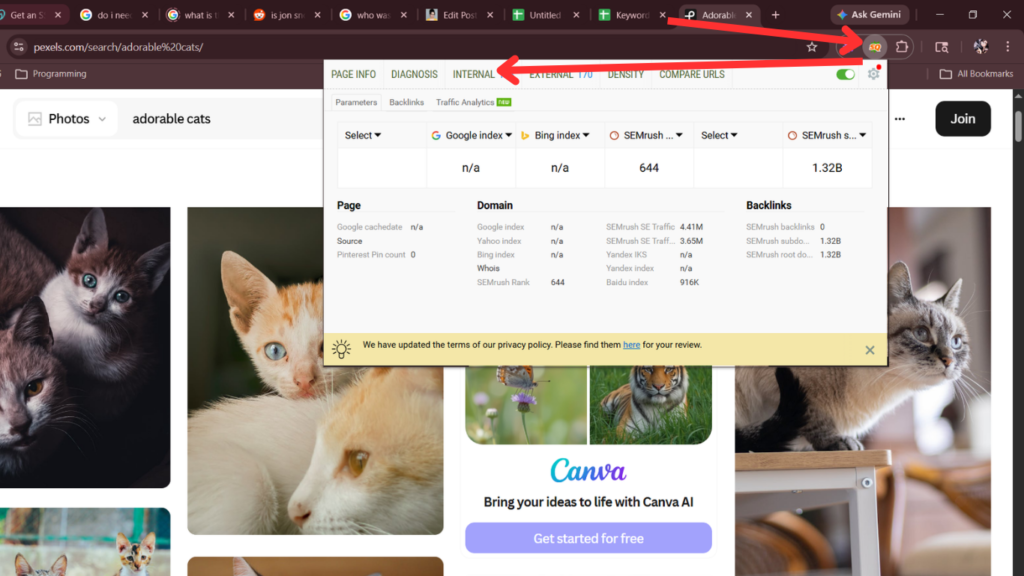
Step 4: Download the links
- Click“Save as CSV.”
- I recommend saving it in a plain text notepad just to ensure
Step 5
- Open the CSV in Sheets or Excel.
- You need to figure out which links are actually YOU vs which links aren’t.
- You might see something like https://dev.soriabio.com/your-username/ which which makes it intuitive.
- But sometimes your name won’t be in the link at all, because you’re identified as a number or sequence of numbers:
- https://dev.soriabio.com/album/12345/678910
- https://dev.soriabio.com/album/12345/678911
- https://dev.soriabio.com/album/12345/678912
- In the above example, the album/12345/ represents an album of you. The 678910 would be each individual image’s link – basically the leaks.
To check, simply paste a few directly into your browser’s URL bar and see what they are to make sure they’re actually your pictures.
Links like this can be extra difficult to figure out, and I have a breakdown of how they work in a separate article with two fictitious websites called “ibridromies” and “leakienudies.”
DMCA Takedown Strategy Guide for Malicious Websies With Seemingly Infinite Links
final thoughts
First, you need to be careful with this method and get comfortable with finding link patterns if you use these methods. It’s not okay to report content that’s not yours and you can get in trouble for it. If you are comfortable with developer tools, I would recommend that method before this one, but it’s really just personal preference.
Overwhelmed?
I have a ton of experience in DMCA. I am not an attorney. I am extremely experienced with DMCA takedowns and how the process works. I offer consultations and manual extraction. Additionally, I am writing my own automated DMCA takedown software.
If you’re interested in letting me test the software using your online usernames, I’d be happy to work something out!